
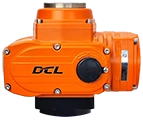







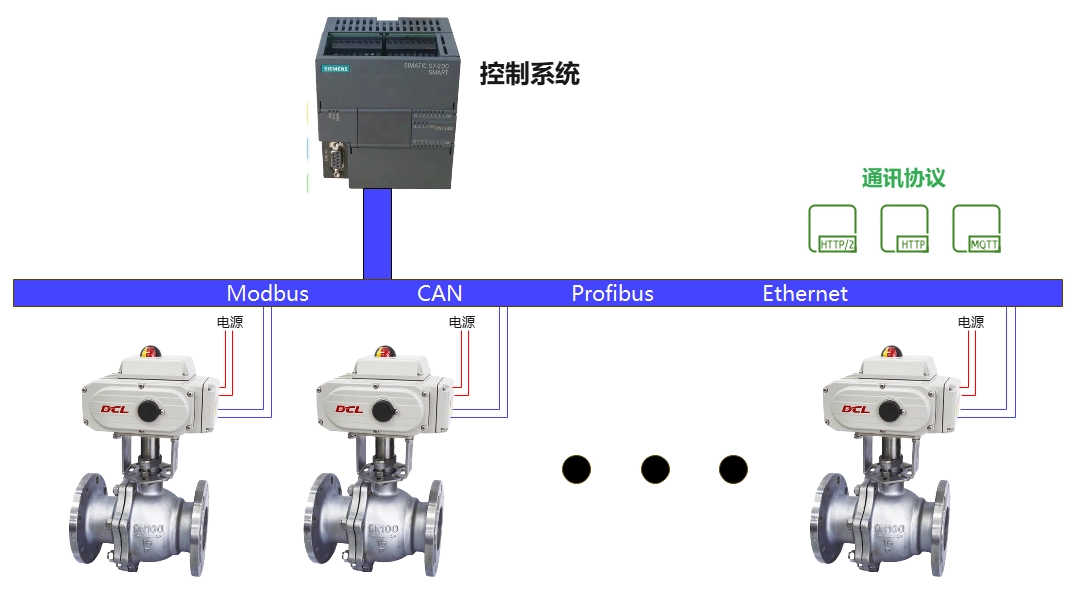
The DCL series actuators support the Modbus-RTU protocol. By referring to this application manual, you can connect the DCL actuator to Modbus.
Panel Description
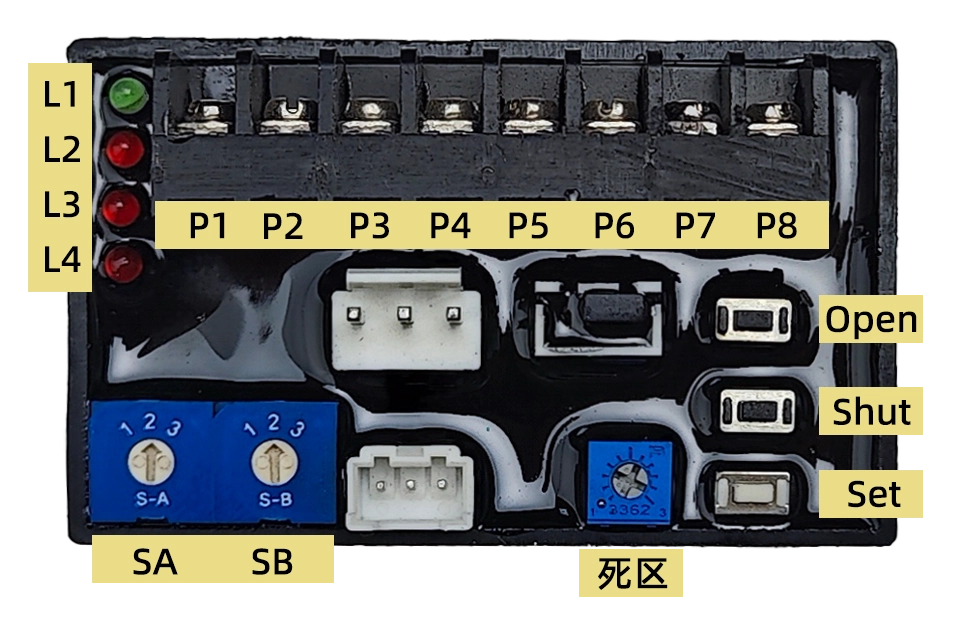
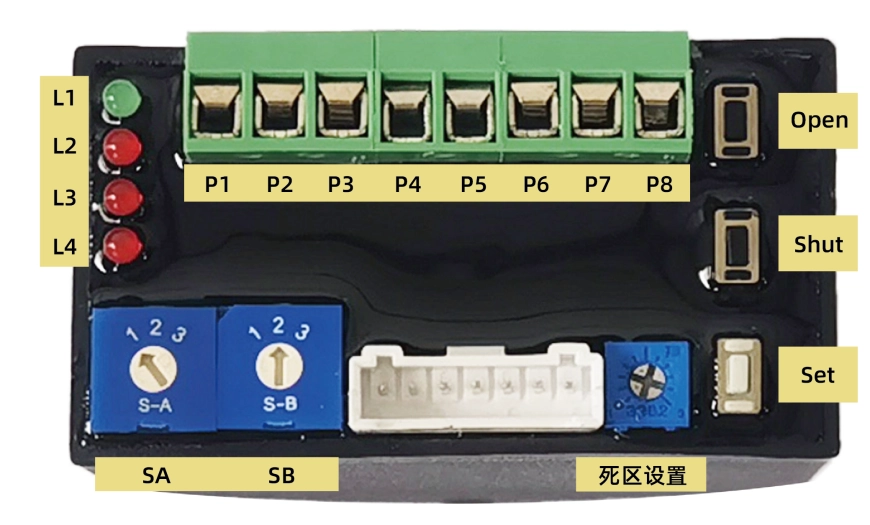
1. Saskarnes definīcija
P1: 220VAC Neutral (N)
P2: 220VAC Live (L)
P3: 4-20mA Input –
P4: 4-20mA Input +
P5: 4-20mA Output –
P6: 4-20mA Output +
P7: RS485 A
P8: RS485 B
2. Buttons
Open: In “Setup Mode” (when switch SA points to “2”), pressing this key opens the actuator, and releasing it stops the motor. Pressing Komplekts un Atvērt simultaneously is used for full-open position calibration.
Shut: In “Setup Mode,” pressing this key closes the actuator, and releasing it stops the motor. Pressing Komplekts un Aizvērt simultaneously is used for full-close position calibration.
Set: Used in combination with Atvērt un Aizvērt in “Setup Mode” to perform specific functions.
3. Selector Switch
SA: Selects the input signal’s direct/reverse action mode and setup state. It must be set while powered on for it to be effective. Factory default is 1:
1 – Direct Action
2 – Setup Mode
3 – Reverse Action
SB: Sets the safety position. When an external control signal is lost, the actuator moves to the specified position. Factory default is 2:
1 – Move to Full Open
2 – Hold Current Position
3 – Move to Full Close
Piezīme: When using Modbus control, SB must be set to position 2.
4. Deadband Value Adjustment Potentiometer
Adjusts the deadband value. Turning clockwise increases the deadband; counterclockwise decreases it. The range is 0.5% – 5.0% (factory default is 1.5%).
5. Indicator Lights
L1 (Green): Power Indicator – Lights up when power is supplied.
L2 (Red): Input Signal Failure Indicator – Lights up when input signal fails.
L3 (Red): Position Detection Failure Indicator – Lights up if the position potentiometer is open, shorted, or damaged.
L4 (Red): Jamming Failure Indicator – Lights up when jamming occurs.
Iestatījumi
To enter “Setup Mode,” set Dienvidāfrikas to position 2. This mode allows for:
Travel calibration
Input signal failure handling
Deadband value adjustment
Manual operation
Output current calibration
1. Setting End-position
Setting End-position of Close: Adjust the valve to the end-position of close using Atvērt and/or Aizvērt buttons. Press Komplekts, then Aizvērt, and hold both for about 4 seconds until L2 lights up, then release both buttons. L2 turns off, indicating setting completion.
Setting End-position of Open: Adjust the valve to the end-position of open using Atvērt and/or Aizvērt buttons. Press Komplekts, then Atvērt, and hold both for about 4 seconds until L2 lights up, then release both buttons. L2 turns off, indicating setting completion.
2. Setting Modbus Address
The Modbus communication address and baud rate can be modified via Modbus commands.
Factory default address: 1
Factory default baud rate: 9600
3. Deadband Value Adjustment
Turning the potentiometer clockwise increases the deadband.
Turning it counterclockwise decreases the deadband.
Each tick mark corresponds to a 0.5% change.
If set below 0.5%, it is automatically processed as 0.5%.
In Setup Mode, use Atvērt or Aizvērt to manually open or close the valve.
Operation
To start automatic operation, set Dienvidāfrikas to position 1 or 3.
Upon power-up, the actuator defaults to 4-20mA signal control.
Sending a Modbus command switches the actuator to communication control mode.
After power cycling, the actuator returns to analog control mode.
Important: When using Modbus control:
Ensure SB is set to position 2.
Every control command must include the control mode and position value to prevent unintended actions after a restart.
Using 4-20mA for Position Control
| Ievades signāls | 4mA | 8mA | 12mA | 16mA | 20mA |
|---|---|---|---|---|---|
| Pointer Position | CLOSE (0) | 2.5 | 5 | 7.5 | OPEN (100) |
| Valve Opening (%) | 0% | 25% | 50% | 75% | 100% |
| Izejas signāls | 4mA | 8mA | 12mA | 16mA | 20mA |
Piezīme:
In reverse action mode, 4mA corresponds to 100% openun 20mA corresponds to 0% open.
Servo controller accuracy level: ±1%
Hysteresis: <1%
Using Modbus to Control Actuator Position
Physical Layer
The DCL actuator supports the Modbus-RTU protocol and uses the RS485 interface at the physical layer.
Communication Address: Configurable from 1 to 127, default is 1.
Baud Rate: Configurable, default is 115200.
Serial Port Format: 1 start bit + 8 data bits + 1 stop bit.
Broadcast Functionality: Supported.
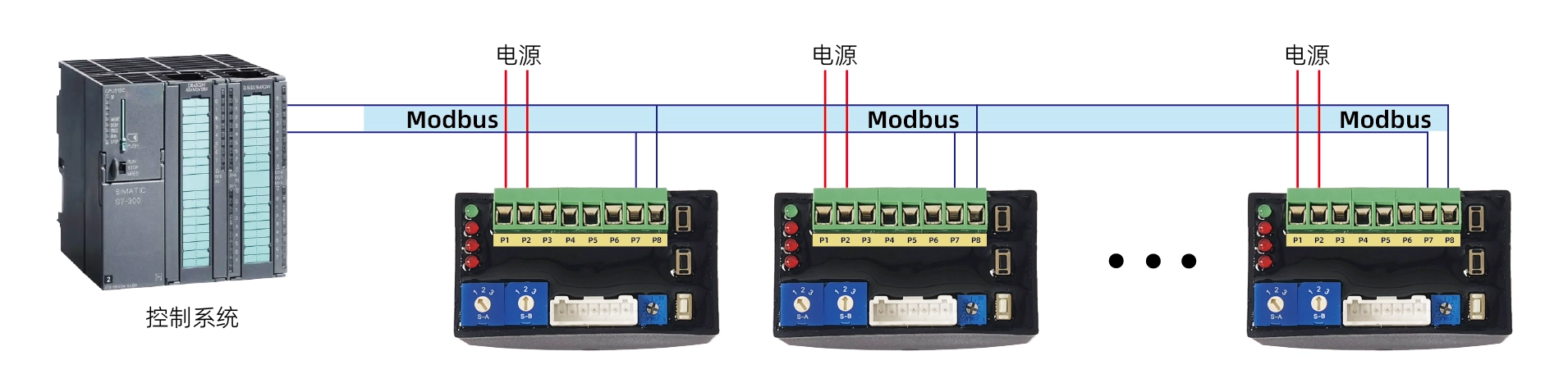
Interface Definition
| Pin | Function |
|---|---|
| P1 | Power (-) |
| P2 | Power (+) |
| P7 | RS485 A |
| P8 | RS485 B |
| P3~P6 | Reserved for analog signals (4 |
Modbus Wiring Diagram
Lietojumprogrammas slānis
1. ADU (Application Data Unit)

2. Funkciju kodi
| ID | Vārds | Description |
|---|---|---|
| 0x03 | Read Multiple Registers | Reads a block of holding registers from a remote device. |
| 0x06 | Write Single Register | Writes a single register on a remote device. |
| 0x10 | Write Multiple Registers | Writes a block of consecutive registers (1 to approximately 120 registers). |
3. Configuring Communication Parameters
Registers 0x0040 – 0x0042 are used for communication settings:
Write 0xA501 to register 0x0040 to enter configuration mode.
Modify register 0x0041 (communication address) and register 0x0042 (baud rate).
The new parameters take effect within 1 second, and further communication must use the updated settings.
Exit configuration mode by writing 0x0000 uz register 0x0040.
4. Forcing Default Communication Mode
Komplekts Dienvidāfrikas uz 2. pozīcija un SB uz 2. pozīcija.
Press and hold the KS button for about 3 seconds until the red light blinks, then release the button.
Press and hold the KC button for about 3 seconds until the red light stays on, then release the button.
The communication parameters are now reset to default values.
Komplekts Dienvidāfrikas back to position 1 to exit this mode.
The new settings remain even after restarting the device.
Piezīme:
If you forget the previous communication parameters, use this method to restore the default communication mode and configure the communication settings again.
Register List
| Register Address | Bits | Group | Signal Name | Min Value | Max Value | Unit | R/W | Type | Description |
|---|---|---|---|---|---|---|---|---|---|
| 0x0010 | b15-b5 | – | – | – | – | – | lasīt/rakstīt | sešstūris | Reserved (0) |
| b4 | kontrole | Apstāties | – | – | – | – | lasīt/rakstīt | sešstūris | 1: Stop, 0: Normal operation |
| b1-b0 | kontrole | Mode | – | – | – | – | lasīt/rakstīt | sešstūris | 1: Communication control, others: Exit communication control |
| 0x0011 | b15-b0 | kontrole | SetOpenDegree | 0 | 10000 | % | lasīt/rakstīt | int/hex | 0-10000 corresponds to 0-100% valve opening (scaling factor: 1/100) |
| 0x0018 | b15-b6 | – | – | – | – | – | r | sešstūris | Reserved (0) |
| b5 | info | kļūda | – | – | – | – | r | sešstūris | 1: Position signal failure |
| b4 | info | kļūdas signāls | – | – | – | – | r | sešstūris | 1: Input signal failure |
| b3 | info | overTorqueFlag | – | – | – | – | r | sešstūris | 1: Overload detected |
| b2 | info | iestrēdzisKarogs | – | – | – | – | r | sešstūris | 1: Jamming detected |
| b1 | info | atvērtā palaišanas karoga | – | – | – | – | r | sešstūris | 1: Opening valve |
| b0 | info | aizvērtRunFlag | – | – | – | – | r | sešstūris | 1: Closing valve |
| 0x0019 | b15-b0 | info | atvērtā grāda | 0 | 10000 | % | r | int/hex | 0-10000 corresponds to 0-100% valve opening (scaling factor: 1/100) |
| 0x0040 | b15-b0 | konfigurācija | cfgMode | 1 | 127 | – | rw | sešstūris | 0x0000: Normal mode, 0xA501: Configuration mode |
| 0x0041 | b15-b0 | konfigurācija | cmm_adrese | 1 | 127 | – | rw | sešstūris | Sets communication address |
| 0x0042 | b15-b0 | konfigurācija | cmm_baudrate | – | – | – | rw | sešstūris | 0: 4800 baud, 1: 9600 baud, 2: 19200 baud, 3: 115200 baud |
Communication Command Examples
1. Control Valve Position
Entering Communication Control Mode:
Send → ◇01 10 00 10 00 01 02 00 01 65 00
Receive ← ◆01 10 00 10 00 01 00 0C
Setting Valve Position: 0%
Send → ◇01 10 00 11 00 01 02 00 00 A5 11
Receive ← ◆01 10 00 11 00 01 51 CC
Setting Valve Position: 50% (5000 → 0x1388)
Send → ◇01 10 00 11 00 01 02 13 88 A8 47
Receive ← ◆01 10 00 11 00 01 51 CC
Setting Valve Position: 100% (10000 → 0x2710)
Send → ◇01 10 00 11 00 01 02 27 10 BF 2D
Receive ← ◆01 10 00 11 00 01 51 CC
Stopping Operation
Send → ◇01 10 00 10 00 01 02 00 11 64 CC
Receive ← ◆01 10 00 10 00 01 00 0C
2. Read Valve Status
Send → ◇01 03 00 18 00 02 44 0C
Receive ← ◆01 03 04 00 30 00 00 FA 3C
3. Set Communication Address
Entering Configuration Mode:
Send → ◇01 10 00 40 00 01 02 A5 01 12 00
Receive ← ◆01 10 00 40 00 01 00 1D
Change Communication Address to: 2
Send → ◇01 10 00 41 00 01 02 00 02 28 80
Receive ← ◆01 10 00 41 00 01 51 DD
Exit Configuration Mode:
Send → ◇02 10 00 40 00 01 02 A5 00 C7 30
Receive ← ◆02 10 00 40 00 01 00 2E
4. Set Communication Baud Rate
Entering Configuration Mode:
Send → ◇01 10 00 40 00 01 02 A5 01 12 00
Receive ← ◆01 10 00 40 00 01 00 1D
Change Baud Rate to: 9600
Send → ◇01 10 00 42 00 01 02 00 01 68 B2
Receive ← ◆01 10 00 42 00 01 A1 DD
Exit Configuration Mode:
Send → ◇01 10 00 40 00 01 02 A5 00 D3 C0
Receive ← ◆01 10 00 40 00 01 00 1D


 English (UK)
  香港中文
香港中文  繁體中文
繁體中文  English (Canada)
  English (South Africa)
  English (Australia)
  English (New Zealand)
  Español de Puerto Rico
  Français du Canada
  Español de México
  Español de Chile
  Español de Colombia
  Español de Uruguay
  עִבְרִית
  Nederlands (België)
  Français de Belgique
  Eesti
Eesti  Latviešu valoda
  Lietuvių kalba
  Norsk nynorsk
  Deutsch (Österreich)
  Slovenčina
  Deutsch (Schweiz)
  Bahasa Indonesia
  English
  Français
  Deutsch
  Italiano
  Español
  Português
  Türkçe
  Indonesia